
Free Restaurant Budget Template for Excel
Plan monthly sales, food and beverage costs, staffing, labor, delivery fees, prime cost, and operating margin for one restaurant location.
Do this with AI
Make this restaurant budget match your operation.
Open the free workbook and ask Griddy to add locations, revenue channels, staffing plans, or cost categories.
Get the restaurant budget workbook
Download the four-sheet Excel file with sample data and editable formulas. No account is required for the download. To customize it with AI, use the Griddy browser workbook option on this page.
Download restaurant budget (.xlsx)The figures are illustrative, not restaurant industry benchmarks. Replace them before making decisions. This is an operating budget, not a payroll or tax calculator.
Worked example: plan your restaurant staffing cost
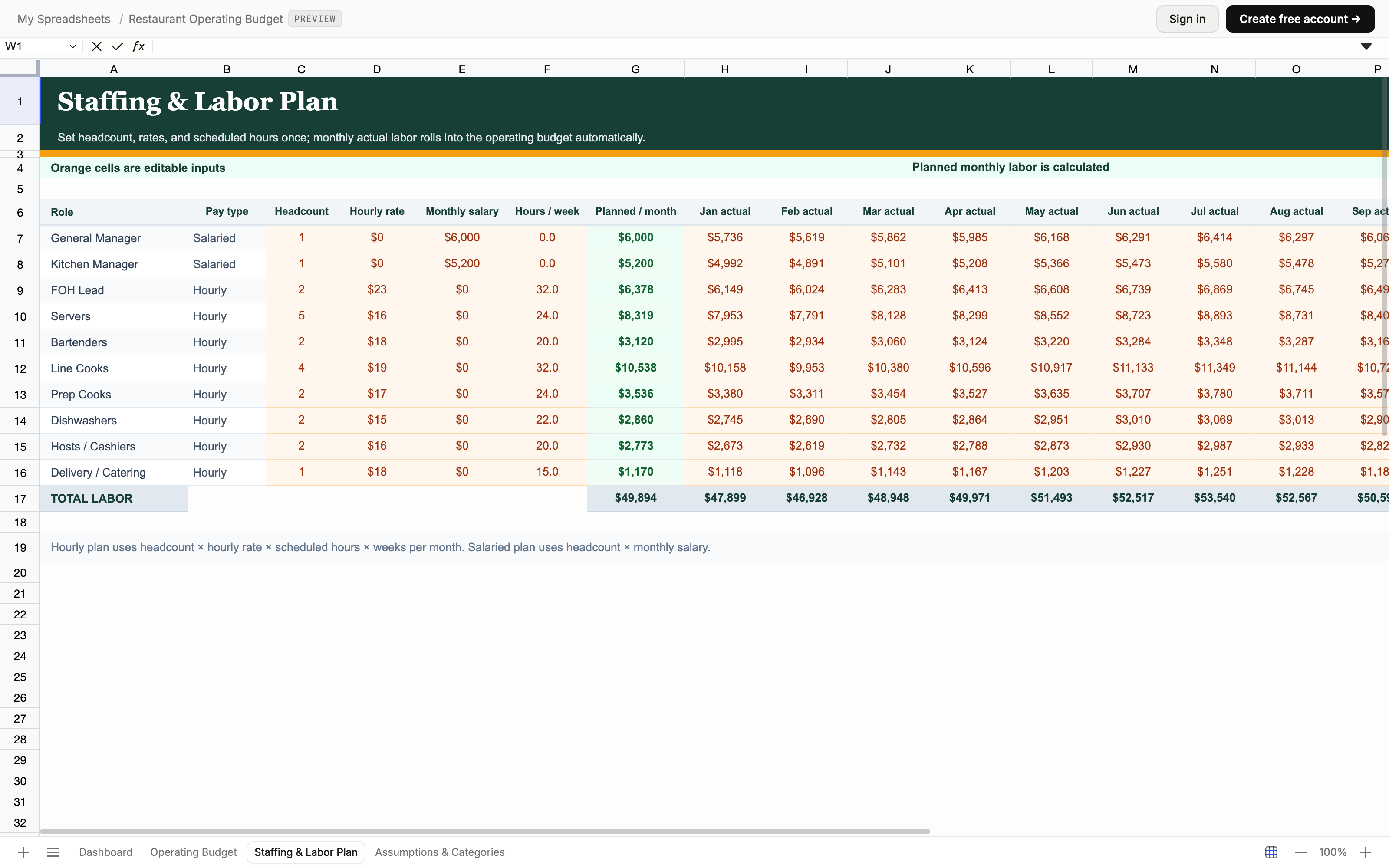
In Staffing & Labor Plan, the sample Servers row has five people, a $16 hourly rate, and 24 scheduled hours per person per week. The shared weeks-per-month assumption is 4.333. Planned monthly pay is 5 × $16 × 24 × 4.333 = $8,319.36, displayed as $8,319.
Change scheduled hours to 25 and the same row becomes $8,666 per month—an increase of $346.64. Hourly roles feed the Operating Budget’s planned hourly labor; salaried roles use headcount × monthly salary. Enter actual monthly pay separately to compare the plan with what happened. Changing planned hours does not rewrite actual payroll.
Build the monthly budget in four steps
- Set your assumptions. Review the food and beverage cost rate, delivery fee rate, and weeks per month in Assumptions & Categories. These drive the plan; they are sample inputs, not recommended targets.
- Plan sales and staffing. Enter monthly dine-in, takeout, delivery, and catering sales in Operating Budget. Set role-level headcount and pay in Staffing & Labor Plan. Adjust rent, utilities, and other operating expense inputs for your restaurant.
- Replace sample actuals. Enter monthly sales and costs from your records, and actual labor in the staffing sheet. Replace future-month sample values too; the dashboard summarizes the values present in the workbook.
- Review the dashboard. Compare food and beverage cost, total labor, prime cost, and operating margin. Investigate differences against your own plan before changing prices, purchasing, or staffing.
Read the results without losing the detail
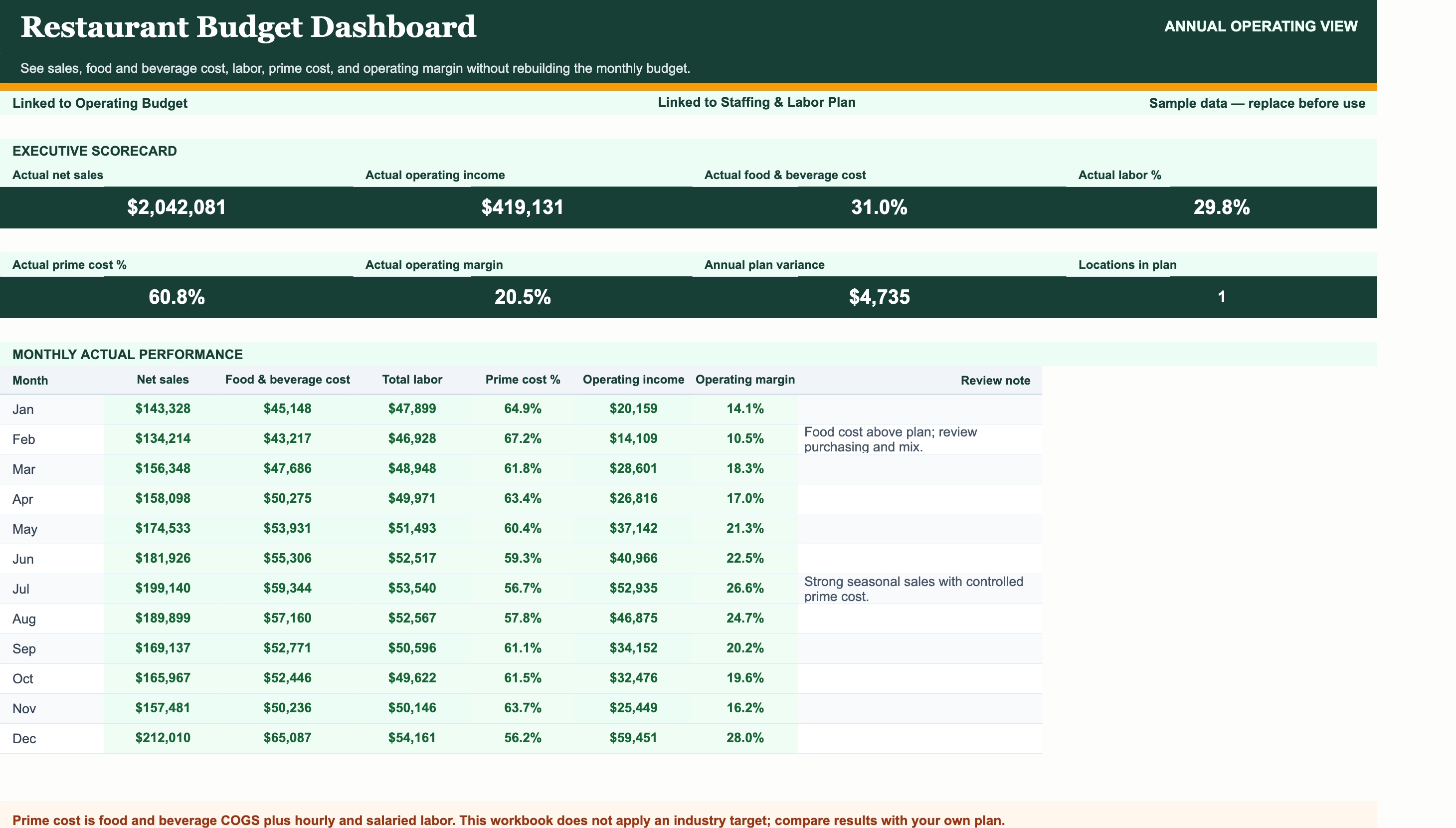
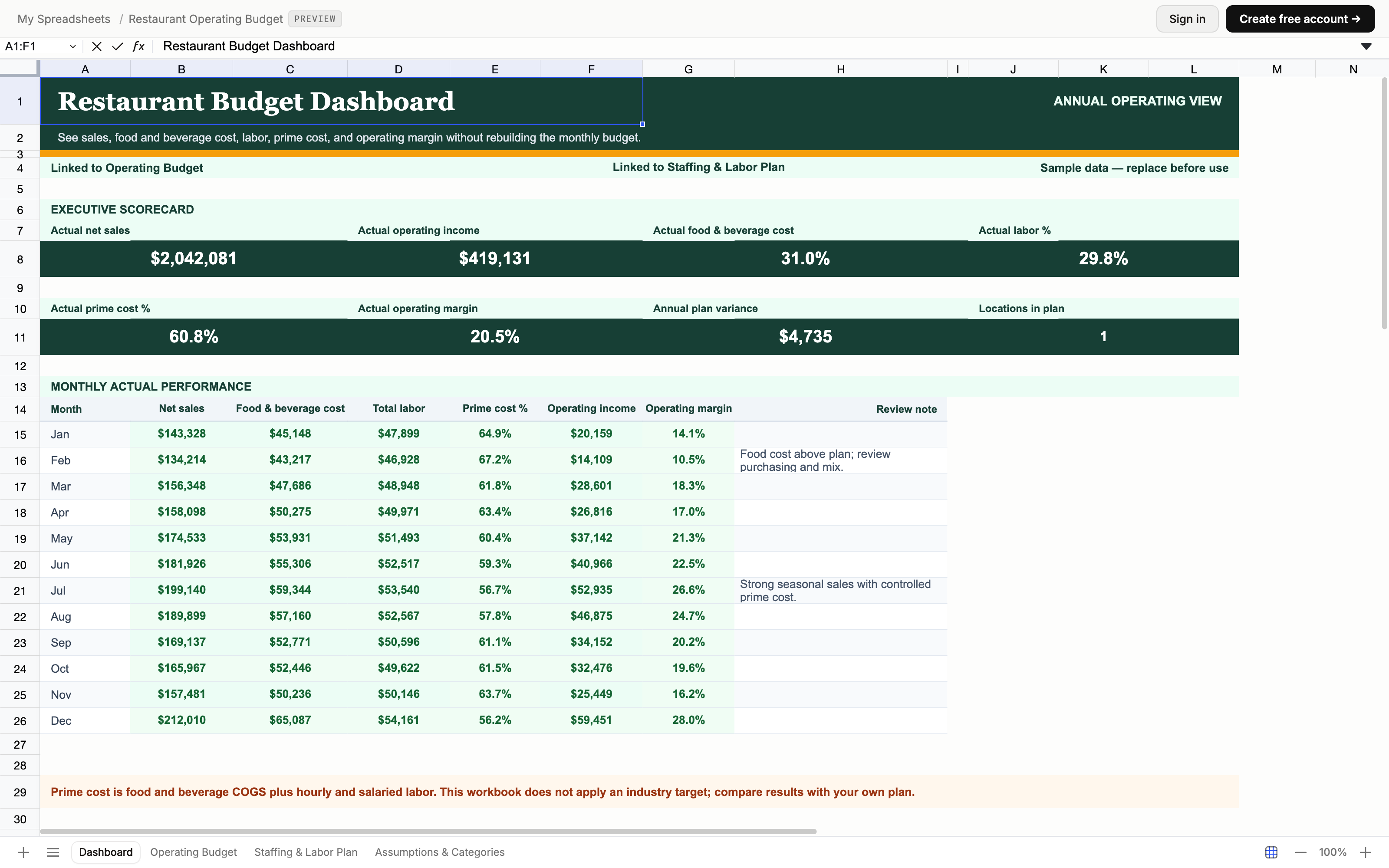
The Dashboard links to the monthly Operating Budget. Prime cost combines food and beverage cost with labor; its percentage divides that total by net sales. Operating margin compares operating income with net sales. A percentage alone does not explain a change: return to the underlying sales, cost, and staffing rows to find the driver.
Keep transaction records alongside the budget. Our Excel expense-tracking guide explains how to organize the records you use for monthly actuals.
Why restaurants need a more specific budget
Restaurant budgets have pressure points that a generic business budget tends to blur: food and beverage cost, hourly and salaried labor, delivery fees, rent, utilities, supplies, repairs, and seasonal sales swings. This workbook separates the drivers that shape gross profit, prime cost, and operating margin so owners can review the operation instead of one undifferentiated expense total.
What is included in the four-sheet restaurant workbook
Dashboard summarizes actual net sales, operating income, food and beverage cost, labor, prime cost, and operating margin by month. Operating Budget holds a 12-month plan-versus-actual model for dine-in, takeout, delivery, catering, direct costs, and overhead. Staffing & Labor Plan calculates role-level planned labor from headcount, rates, and hours and stores monthly actuals. Assumptions & Categories keeps the editable cost, fee, and weeks-per-month drivers in one place.
Who should use this template?
This workbook fits restaurant owners and managers who want to review a single restaurant location’s monthly sales, operating costs, and staffing plan together. For separate location views, duplicate or segment the budget rather than combining locations into the sample.
What this workbook covers
Use it for operating-budget planning and monthly actual comparisons. It is not a recipe-costing or startup-cost planner, payroll processor, or tax-preparation tool. Replace the illustrative sample inputs and compare results with your own plan; the workbook applies no industry benchmark target.
How to use it well
Replace every sample amount, role, and assumption with your own operation. Update monthly actual sales and costs, keep staffing actuals current, and review prime cost and operating margin against your own plan. The workbook intentionally applies no industry benchmark target. Griddy can add locations, revenue channels, staffing roles, cost categories, or a new management view without rebuilding the model.
Related guides
Learn how teams actually use this template
How to Add a Trendline in Excel
Add a trendline in Excel to show direction, seasonality, and movement in sales, costs, forecasts, and operational data over time.
Read guideExcelHow to Create a Macro in Excel
Create an Excel macro to automate repeated formatting, cleanup, reporting, and data-entry steps without rebuilding the workflow by hand.
Read guideExcelHow to Create a Waterfall Chart in Excel
Create a waterfall chart in Excel to show how revenue, costs, adjustments, and changes move from a starting value to an ending total.
Read guideDo this with AI
Make this restaurant budget match your operation.
Open the free workbook and ask Griddy to add locations, revenue channels, staffing plans, or cost categories.


