
Official product overview
Spreadsheet work, said plainly.
Griddy is an AI spreadsheet assistant for the browser, Microsoft Excel, and Google Sheets. Describe the result you need, and Griddy can make supported spreadsheet changes for you.
Free to start. See current pricing for plan details.
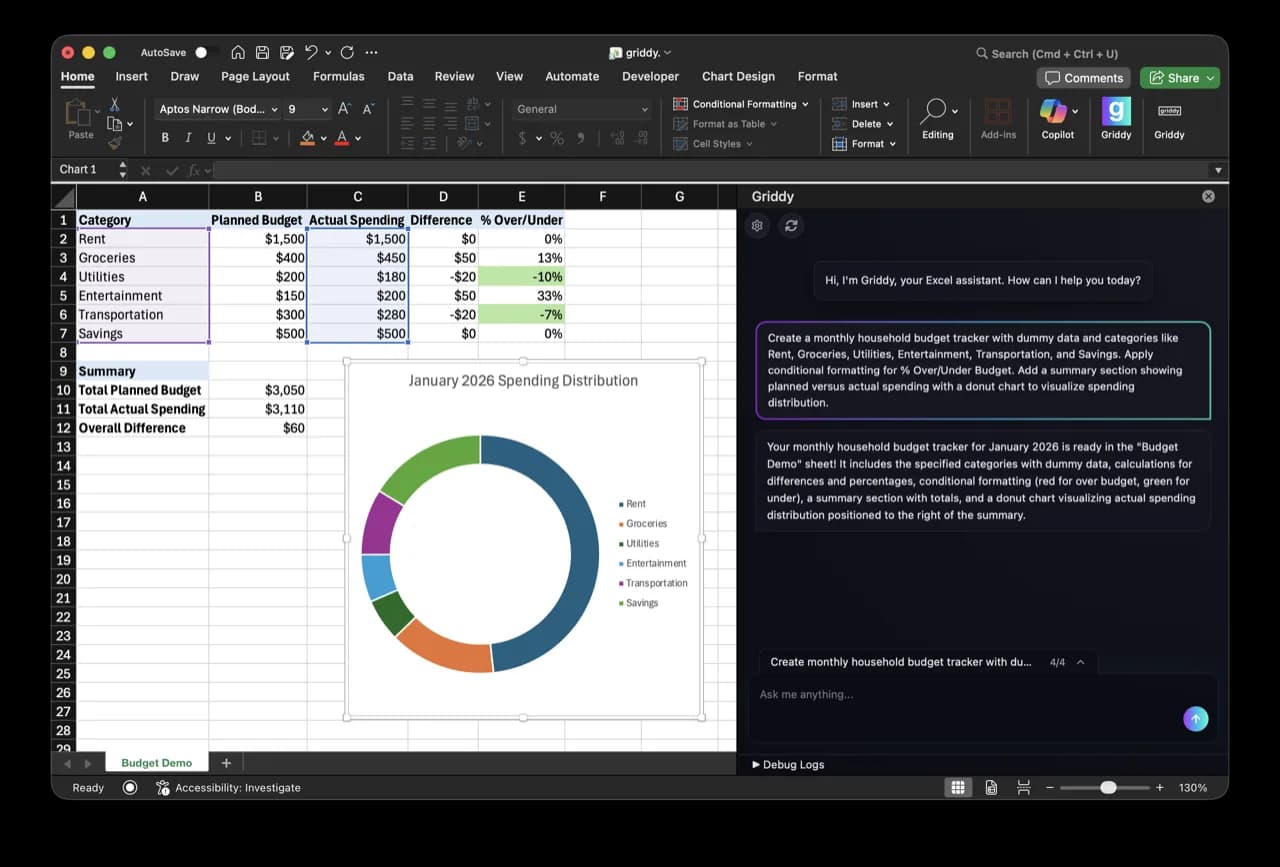
The direct answer
Griddy turns plain English into spreadsheet work.
It is designed to help people create, change, and understand spreadsheets without translating every task into a long sequence of menu clicks or formulas first. Experienced spreadsheet users can use the same workflow to move faster while keeping the result editable in the grid.
Where it works
Three spreadsheet surfaces.
Start a new file in Griddy, or bring the assistant into the spreadsheet tool you already use.
Griddy in the browser
Start a spreadsheet in Griddy's own web app and work with the AI assistant beside the grid.
Open the browser appGriddy for Microsoft Excel
Install the Excel add-in from Microsoft AppSource and use Griddy inside an existing workbook.
View on AppSourceGriddy for Google Sheets
Install the Google Workspace add-on and use Griddy from a Google Sheets sidebar.
View on Google WorkspaceWho it is for
Easier for a first-time builder. Faster for an expert.
Everyday spreadsheet users
Start with the outcome, not the syntax.
Describe the tracker, cleanup, formula, or report you need in ordinary language. Griddy makes the supported changes in the spreadsheet so you can inspect and continue editing the result.
Analysts, operators, and finance teams
Move through repetitive mechanics faster.
Use bounded prompts for formula fills, formatting, model structure, cleanup, charts, and pivots while keeping the workbook and its logic available for review.
Current capabilities
What Griddy can help make.
Formulas
Write, fill, explain, or repair formulas across named cells and ranges.
Data cleanup
Split columns, trim text, standardize values, remove duplicates, and reshape tables.
Formatting
Apply number formats, headers, borders, sizing, and supported conditional rules.
Charts and pivots
Create editable charts and native pivot tables from a defined source range.
Workbook structure
Build tables, summaries, and connected multi-sheet spreadsheet workflows.
Limits to know
AI speeds up the work. You still review the result.
Griddy requires an internet connection and an account. The Excel and Google Sheets versions also need permission to access the workbook you choose.
Available operations can differ between the browser, Excel, and Google Sheets. Not every spreadsheet feature or workflow is supported on every surface.
AI can misread an ambiguous request, incomplete source data, or a business assumption. Review formulas, ranges, totals, and created objects before relying on the result.
For financial, legal, medical, or other high-stakes work, independently verify the source data and the finished spreadsheet.
Clear prompts, bounded ranges, and visible review steps produce more dependable work. Undo or refine a result that does not match the intended outcome.
Free to start
Try the actual workflow.
Griddy has a free plan for its browser spreadsheet and the Excel and Google Sheets add-ins. Current pricing lists plan features and usage limits.
Compare the fit
Griddy and other spreadsheet AI tools.
Product fit depends on where you work, how much workbook context the tool can use, and whether you need advice or direct spreadsheet edits. Our comparison pages link to the current sources behind their claims.
Sources and freshness
Check the current details.
This overview was last reviewed on August 19, 2026. Product capabilities and plan limits can change; these pages contain the current Griddy details.
Start with one task